
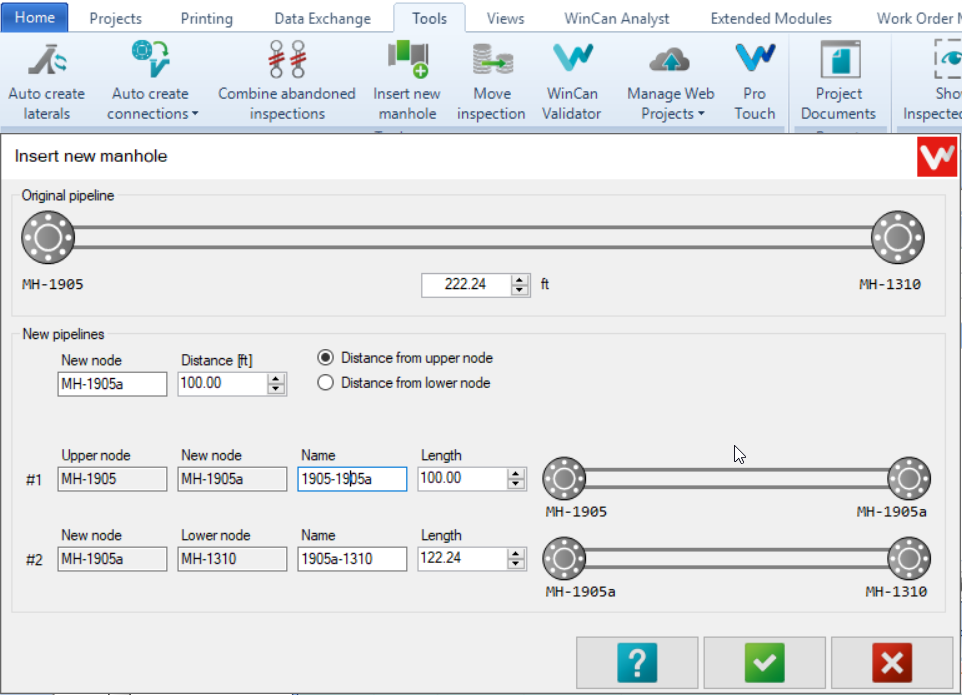
This tool is used to insert new manholes found during inspections. The tool will:
- Create a new Manhole in VX.
- Create a new Section in VX.
- Change the Upstream and Downstream of each section accordingly.
- Recalculate the length of each section.
During the inspection, if we find a new manhole we can follow these steps:
- End the current inspection at the new manhole with the AMH code.
- Click under Tools>Insert new manhole.
- Insert the new node distance then chose if the distance is from the upper or lower node.
- This will auto-populate some fields like the new node name by adding a letter 'a' at the end of the name of the previous manhole.
- We recommend changing the name of the new sections to reflect the new Manholes.
- A new section will be available now for the next inspection.
Comments
0 comments
Please sign in to leave a comment.