
The Copy tool can be used to create a new WinCan VX project from a project or a set of assets from a project using the filters.
We can use the copy tool to:
- Move a set of assets from one project to another computer.
- Merge a set of assets from one project to another project using the Merging tool.
- Make a project with Section header information only and no inspections with the purpose of inspecting them again.
- Create a local project (.sdf) from a SQL server project.
Here are the steps:
- Open the existing project to get a copy of.
- Filter any data if needed (see How to use Filters for more information)
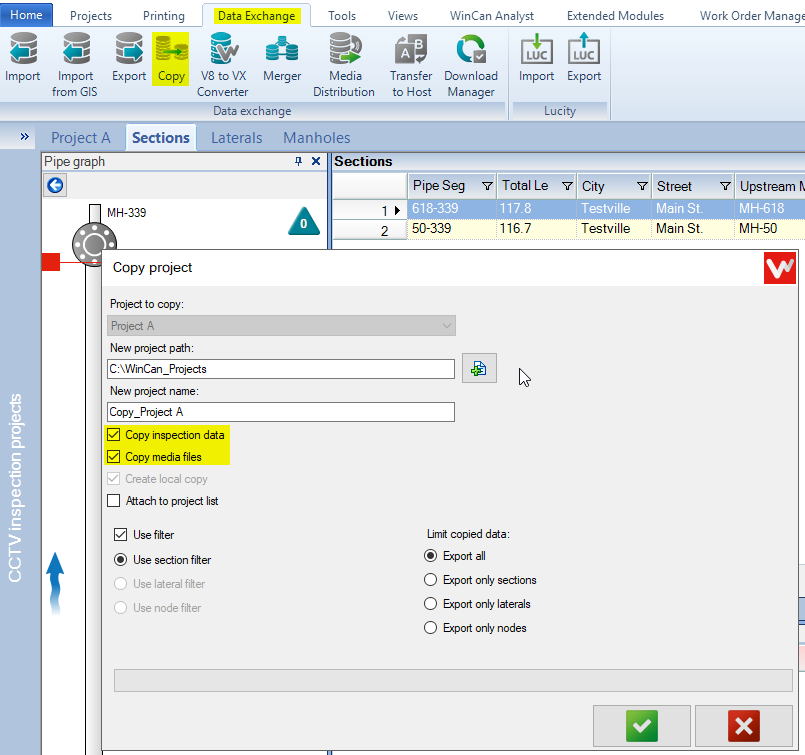
- Click on DataExchange > Copy.
- Change the New project path if necessary.
- Change the New Project name if needed.
- Check the "Copy inspection data" option to copy all of the observations
- Check the "Copy media files" to copy the videos and pictures.
- Check the "Attach to project list" if you would like to have the new project added to your project list
Comments
0 comments
Please sign in to leave a comment.